This small update contains a number of new features. In summary:
- Rolling Working Patterns
- Absence Detail Report
- Alternative Public Holidays
- Forgot Password Support
- Email Admins When Employees Go over Entitlement
Details of each update are included below, and you can also explore the full range of Holiday Tracker features.
Rolling Working Patterns
It’s now possible to specify working patterns in multiple weeks that then “roll” on repeating themselves. When adding a new Working Pattern from the Employment History page, you can now click the Rolling Pattern tab to specify multiple weeks:
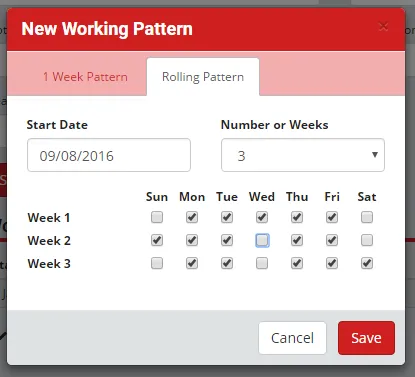
You can specify the start date as usual, but can also select the number of weeks you want in the pattern (up to 10), and then pick the working days for each week of the pattern.
Absence Detail Report
The Absence Detail Report enables you to drill down into the records that make up the absences in your data:
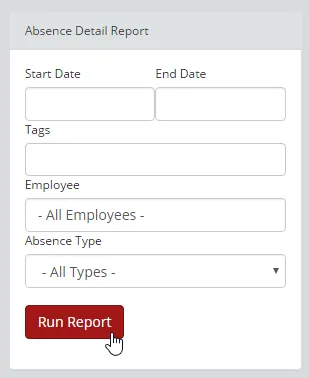
You can filter by date range, tags and absence type, or enter an employee’s name to run the report specifically for that employee. For example, to get the start and end dates for any sick leave for Eric Employee this month, enter the start and end of the month, enter Eric Employee in the Employee box and select Sickness from the Absence Type dropdown.
Alternative Public Holidays
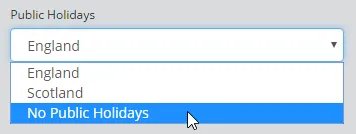
We initially focused our marketing efforts on companies in England, so The Holiday Tracker previously only supported English Bank Holidays, but as we’ve grown, we now have customers in other countries so have adapted to support the different public holidays of other countries, and we can even support a mixture where you can specify the public holidays to be used on an individual basis. Including the ability to ignore public holidays altogether:
If you need to check an employee’s allowance, including public holidays, you can calculate holiday entitlement with our free calculator.
As with many features that are not of interest to most customers, this feature will be hidden by default – if you’d like to be able to specify the Public Holidays for each employee, please get in touch and we’ll active this feature for you.
Forgot Password Support
This was actually rolled out about a month ago, but as it wasn’t mentioned in a blog post, it seems worth mentioning here.
Beneath the Login button on the Login page, there is now a “Forgot Password?” link:
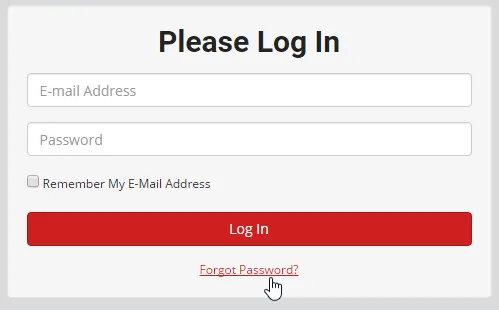
If a user clicks this they’ll be asked for their email address. We will then send an email to that address containing a link they can click to reset their password. When they click the link, we’ll reset their password to something random and then email that to them.
Email Admins When Employees Go over Entitlement
Another feature that is turned off by default, so get in touch if you’d like it turned on. When an employee goes over their holiday entitlement, we already display a banner warning anyone that views their calendar:

Our employee holiday tracker can also alert Admins when a request takes someone over their entitlement, so you can investigate straight away.
If you have any questions or feedback regarding this update, don’t hesitate to get in touch: support@theholidaytracker.co.uk